The work environment for office-based jobs has changed dramatically over the last few years. Many of us have traded a corner office for a corner of the kitchen table. Although the changes have been good in many ways, creating a comfortable, ergonomically correct home office has not always been at the top of the priority list. And many of us have the sore backs and stiff necks to show for it.
If you’ve ever spent the day slumped over a desk or hunched over your keyboard, you know just how painful poor posture can be. Good posture is more than balancing a stack of books on your head while walking. It’s about holding your body correctly both when moving and at rest. Done right, it can prevent pain, injury and other health issues. Done incorrectly, it can wear away at your spine, decrease flexibility and make you more prone to injury.
That’s where office ergonomics comes in. Ergonomics refers to the science of making things comfortable, efficient, safe and effective to use. We talked to Jose Santos, a physical therapist at OhioHealth Associate Health, to get his tips for setting up an ergonomic home office to make it easier and less painful to get your work done.
Position yourself for success
“The first things to consider when putting together your home office are your available space and budget,” says Jose. “Are you setting up on a kitchen table or are you in a dedicated space? Do you have the budget to get a nicer chair? Do you require any special equipment or technology to get your job done? Really think about what you need and whether it will improve how you go through your workday.”
Position is everything, according to Jose. He recommends following guidelines from the Ohio Bureau of Workers’ Compensation.
“Your goal is to sit in a neutral position. You want your joints to align naturally as you go through your day. Working in the proper position reduces strain and stress on your muscles, bones and tendons. It’s also a lot more comfortable,” he explains.
To maintain a neutral body position while using a computer:
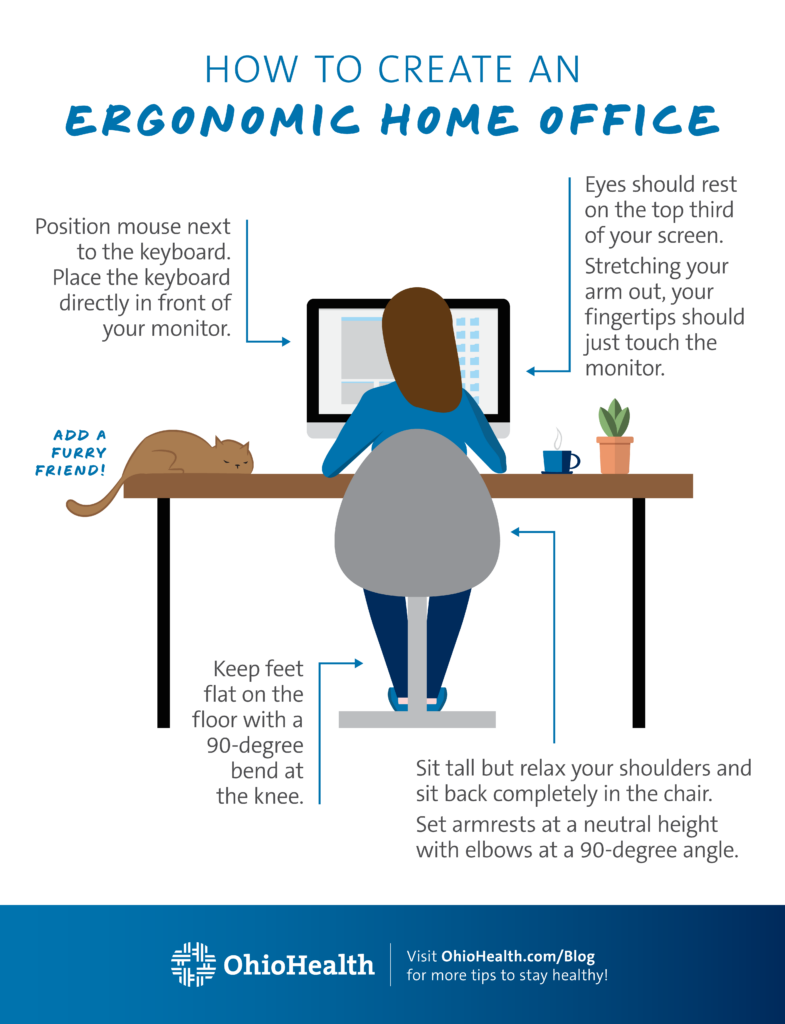
- Sit tall with your neck upright. Relax your shoulders and sit back completely in your chair.
- Place your chair’s armrests at a neutral height, allowing your elbows to remain close to your body and flexed at a 90-degree angle. Raise or lower your chair to achieve the proper height for your work surface.
- Adjust your chair to provide support for your lower back and arms. Use a rolled-up towel or small pillow if your chair lacks lumbar support.
- Position your mouse next to your keyboard and place your keyboard directly in front of your monitor.
- Set your monitor so your eyes rest on the top third of the screen. Aim for the very top of your screen if you wear bifocals. Use a monitor riser, a pile of books or a stack of boxes – anything that’s level and stable – to get the height you need.
- Put your monitor directly in front of you and stretch your hand out. It’s at the proper distance when your fingertips just touch the screen.
- If you use two monitors, put them both next to each other, side by side, at the same height and angled slightly in. Minimize the gap between them to reduce the strain on your neck that comes from moving your head back and forth from side to side.
- Keep your feet flat on the floor. Use a footrest if you need one. You want a 90-degree bend from your knee joint to the floor. Keep your knees below your hips to reduce the likelihood of hip pain.
Take a break
You must give your body a break throughout the day – even if everything in your home is perfectly placed. Jose advises making regular movement part of your daily routine.
“Stand up and do a few stretches or shoulder rolls while you answer email. Or change positions every time you answer the phone. Just move,” he says.
Remember, your eyes could use a rest as well.
“Your eyes put in a full workout during office hours. You have to give your eye muscles a break just like your shoulder or wrist muscles,” says Jose.
He advises using the 20/20/20 Rule and good lighting to combat the issue. “Every 20 minutes look 20 feet away for 20 seconds,” he explains. “Adjust your lighting to prevent screen glare. Add a task light or close your blinds to control the room’s brightness.”
Research shows the number of people working remotely increased 24 percent between 2021 and 2022. And experts don’t expect that trend to change any time soon. If you’re one of the many people who’ve traded their morning commute for a home-based office, experts at OhioHealth can help you put together a well-designed workspace that won’t make you work harder than you have to.